
Solutions
Proven modules, tailored to your processes.
Yardly is built on ready-made modules: fleet, maintenance, documents, equipment and reports. We adapt them to how you work, connect them to your existing systems and add your own business rules.
- Built for
- Logistics companiesWarehousing and distributionTransportMulti-site operations
Workflow automation
What runs on spreadsheets and e-mail today becomes a system.
Every company works differently, so we don't hand you a ready-made process. We automate yours, alongside the systems you already have.
Extend your existing systems
Yardly is added alongside the systems you already use and takes data from where it already lives.
- Custom connections to your software
- Fuel, document and asset data in one place
- Existing systems stay in place
Business logic, by your rules
Due dates, approvals, notifications: we build the steps around the way you work.
- Scheduling by mileage, hours or date
- Approval and inspection steps
- E-mail and SMS reminders in several steps
Maintenance you can plan
From existing mileage and usage data, the system estimates when the next mandatory service is due.
- Estimated date for mileage-based schedules
- Transparent calculation from your own data
- Cost and cost-per-km ranking
Reporting that keeps up
Costs and deadlines summarised automatically, ready for accounting and management decisions.
- Costs by category and by vehicle
- Management summary in PDF
- CSV and Excel export
Modules
Eight modules to build your system from.
You don't need all of them. Based on the assessment, we switch on and tailor the ones you need.
-
01
Fleet management
Vehicle and driver records, service log, maintenance and fuel in one register.
- Assignment to sites and drivers
- Fuel consumption per refuelling
- Excel import from your current list
-
02
Documents and expiry alerts
Every document linked to a vehicle, driver or asset, with an expiry date. The system warns you in time.
- Your own document types, versioning
- Alerts 30, 14, 7 and 1 day ahead
- E-mail and SMS
-
03
Condition checks
Your own checklists, completed by staff on their phone without logging in.
- Drag-and-drop template editor
- One-time link sent by e-mail
- Searchable history
-
04
Equipment
Forklifts, machines, tools and IT equipment, tracked down to the warehouse and shelf.
- Your own categories and locations
- Owner and purchase value
- Stocktake by e-mail with a PDF report
-
05
Costs and reports
Insurance, leasing, fuel and service by category, vehicle and period.
- Automatic categorisation
- Management summary in PDF
- Full database export to Excel
-
06
Analytics and forecasting
From your own history: cost-per-km ranking, estimated service dates, threshold-based replacement suggestions.
- Estimated dates for mileage schedules
- Explainable, threshold-based rules
- For vehicles and equipment
-
07
Team and permissions
As many roles as you need, with per-feature permissions and multiple sites.
- Custom roles
- Four-level permission matrix
- Breakdown by site
-
08
Customisation
The interface carries your brand, and you decide what the lists contain.
- Your logo and accent colour
- Editable catalogues
- Change log
What it looks like
A system your maintenance lead will actually want to open.
Real screenshot from the Yardly test environment with demo data. The interface is currently in Hungarian.
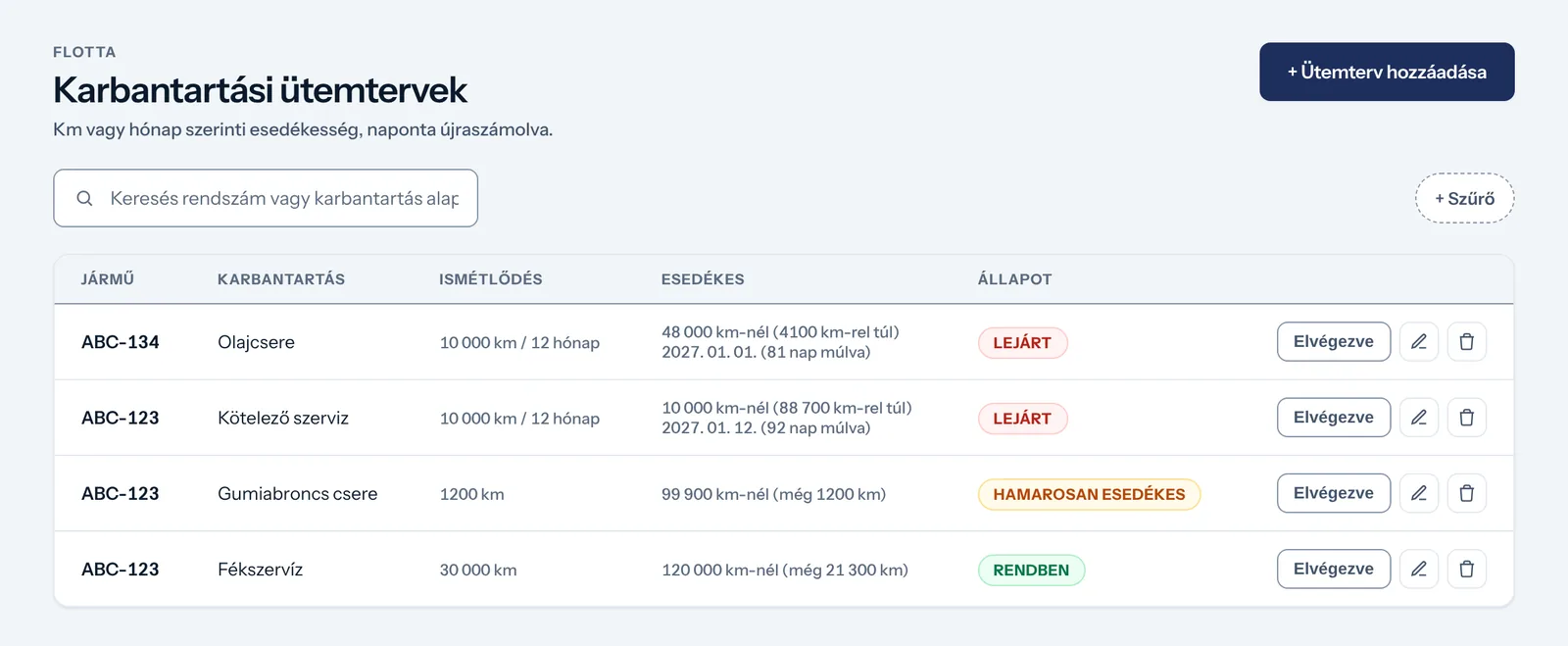
Due dates by mileage or calendar
Maintenance schedules are set by mileage or by calendar period. The system recalculates due dates every day and highlights anything overdue.
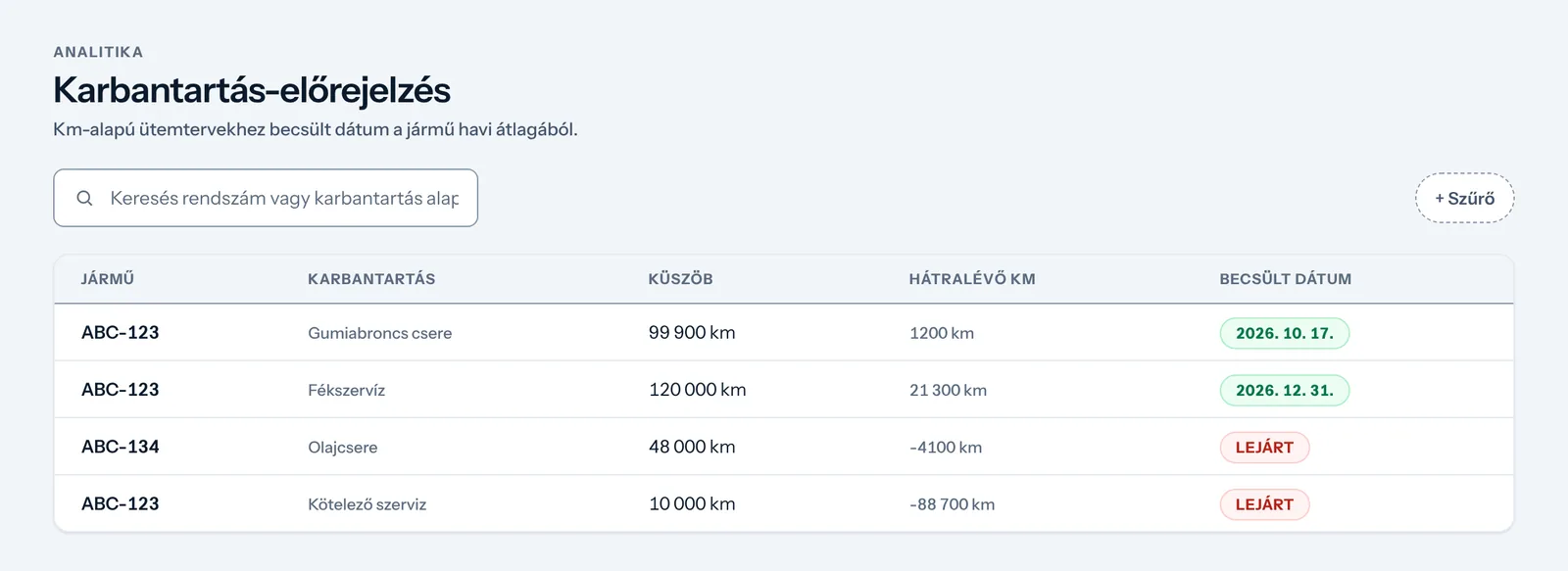
Service dates estimated from your own data
For mileage-based schedules, the system uses each vehicle's monthly average to estimate when service is due, so you can put it in the calendar.
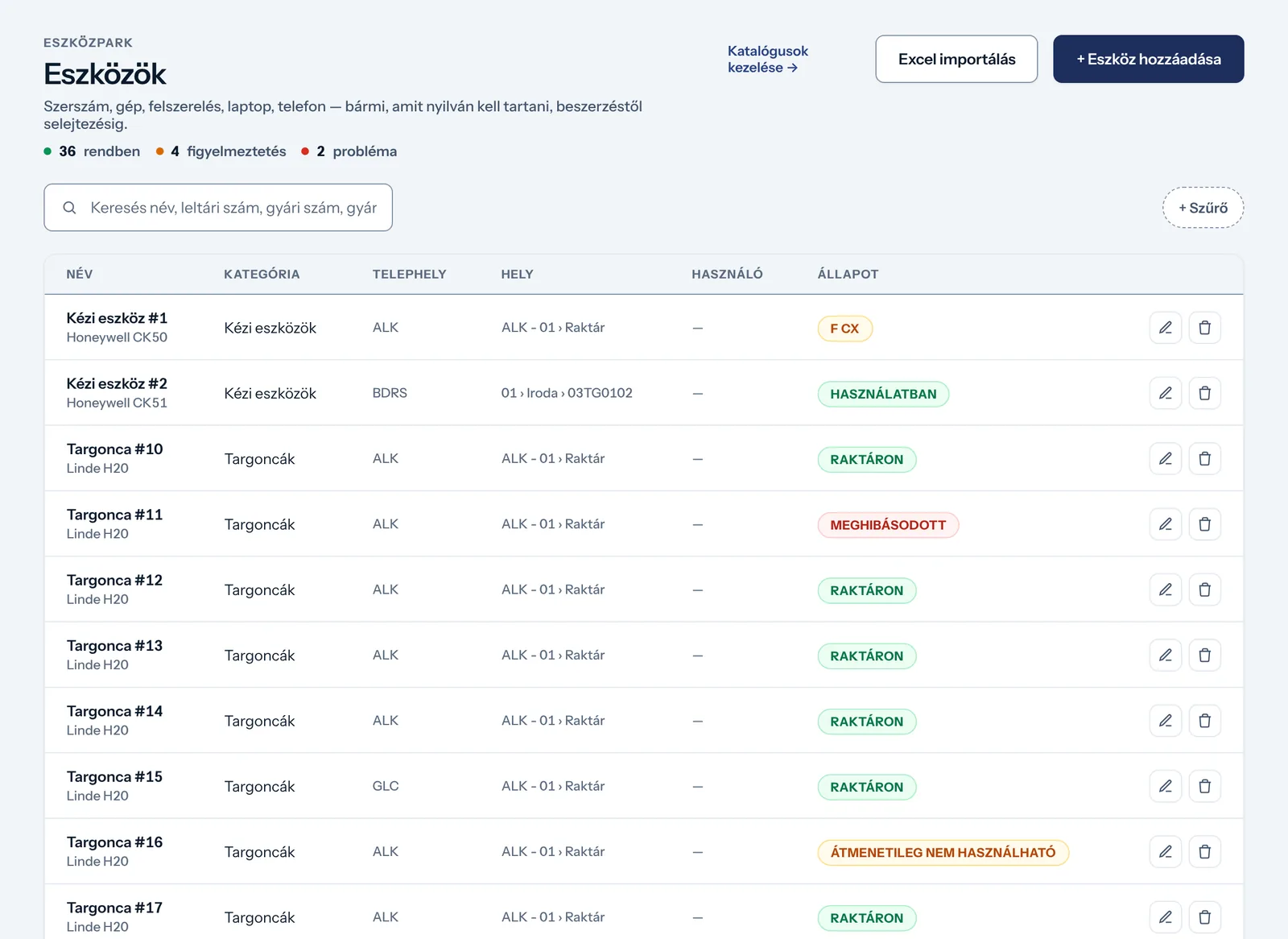
Forklifts and machines in one register
Every asset has its own category, site, location and status. Service and stocktakes are handled in the same place.
How we work
From a free assessment to ongoing support.
Every project starts with a conversation and doesn't end at go-live.
-
Free
Assessment
We learn your processes and the systems you use, and find where most time is lost.
-
Together
Design
We decide which modules and what custom logic you need, and send an individual quote.
-
Tailoring
Delivery
We tailor the system, connect your data sources and bring over your existing records.
-
Ongoing
Operation and support
We stay with you after go-live: we find the cause of any issue and fix it as quickly as possible.
Hosting and security
Your data stays in the EU or on your own server.
Choose between two ways of running Yardly. The system and its security measures are the same in both.
Security measures
- Role-based permissions, per feature
- Change log: who changed what, and when
- Encrypted connections (HTTPS/TLS, HSTS)
- Two-step sign-in with a code sent by e-mail
- Data separated per company
- Penetration testing
Pricing
An individual quote with a fixed monthly fee.
There are no packages, because no two projects are the same. After the free assessment, once we know exactly what you need, we send a quote. Pricing covers implementation, a fixed monthly usage fee agreed in advance, and ongoing support.
- 01Free assessment
- 02Individual quote
- 03Fixed monthly fee
Next step
Start with the process that takes the most time today.
In a short meeting we'll look at it together and show what automating it would involve.